 AWS
 Azure
 Google Cloud
In one sentence: a budget reads billing data that trails usage by hours and only sends a message, so the alarm that catches a runaway resource watches its usage metric, and the budget is the backstop.
Symptom
A function looped on its own events overnight. The cost line for it stepped up hours before the first budget email arrived, the anomaly alert came a day later still, and the forecast threshold never fired. Usage kept running after every message.
How it happens
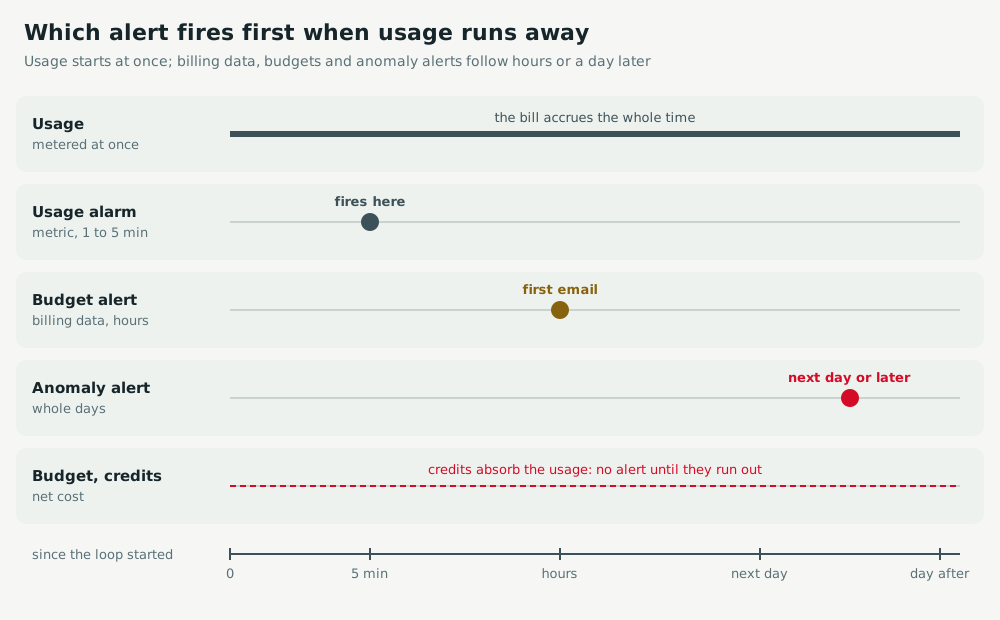
- Lag: usage is metered at once, billing data lands hours later, and the budget is evaluated on that data. Anomaly detection works on whole days.
- No brake: a budget notifies. Nothing stops unless the alert is wired to an action.
- Hidden spend: forecasts need history, and a budget on net cost stays quiet while credits absorb the usage, until they run out.
Act
AWS
Alarm on the usage of whatever can run away, such as Lambda Invocations per five minutes, and keep a stop switch ready. Then add a budget with a FORECASTED threshold and a budget action, and a Cost Anomaly Detection subscription with IMMEDIATE frequency on an SNS topic.
aws cloudwatch put-metric-alarm --alarm-name orders-fn-runaway --namespace AWS/Lambda \
  --metric-name Invocations --dimensions Name=FunctionName,Value=orders-fn \
  --statistic Sum --period 300 --evaluation-periods 1 --threshold 50000 \
  --comparison-operator GreaterThanThreshold --alarm-actions "$ONCALL_TOPIC"
aws lambda put-function-concurrency --function-name orders-fn --reserved-concurrent-executions 0
Azure
Put a metric alert on the function app's FunctionExecutionCount, evaluated every minute. Give the Cost Management budget a Forecasted threshold and an action group whose runbook stops the app. Anomaly alerts only arrive about a day and a half after the day ends: keep them for drift.
az monitor metrics alert create -n orders-fn-runaway -g rg-app --scopes "$FUNCAPP_ID" \
  --condition "total FunctionExecutionCount > 50000" --window-size 5m \
  --evaluation-frequency 1m --action "$ONCALL_ACTION_GROUP"
Google Cloud
Alert in Cloud Monitoring on run.googleapis.com/request_count for the function, and cap it with --max-instances. Make the budget count gross usage, add a forecast threshold, and send notifications to Pub/Sub so a function can act on them.
gcloud billing budgets create --billing-account="$BILLING_ACCOUNT" --display-name=monthly \
  --last-period-amount --credit-types-treatment=exclude-all-credits \
  --threshold-rule=percent=0.5 --threshold-rule=percent=0.9,basis=forecasted-spend \
  --notifications-rule-pubsub-topic=projects/ops/topics/budget-alerts
Keep watch
AWS
Drill it: aws cloudwatch set-alarm-state --alarm-name orders-fn-runaway --state-value ALARM --state-reason drill must page on call within a minute. aws budgets describe-notifications-for-budget must list a FORECASTED notification.
Azure
Drill it: az monitor action-group test-notifications create must reach on call. The budget's alert conditions must include a Forecasted type, and the runbook's last job must show the app stopped in a test subscription.
Google Cloud
The Pub/Sub function's logs must show budget messages with costAmount and alertThresholdExceeded. A load test on a staging function must fire the request count alert within minutes, long before the budget moves.
Exercise
Make a cost alarm reach someone in Two incidents that alerted nobody, then Alarm fires, nobody gets paged.
Related: resources left behind after a teardown, and the loop itself in functions that trigger themselves.