 AWS
 Azure
 Google Cloud
In one sentence: a function that writes to the place that triggers it runs again on its own output, so break the loop by where it writes, not by a check in the code, and keep a way to stop it in one command.
Symptom
Right after a deploy, invocations and storage write requests climb together, hour after hour, with no new uploads behind them. Duration looks normal and nothing reports an error; the first alert is a cost anomaly or a concurrency limit.
How it happens
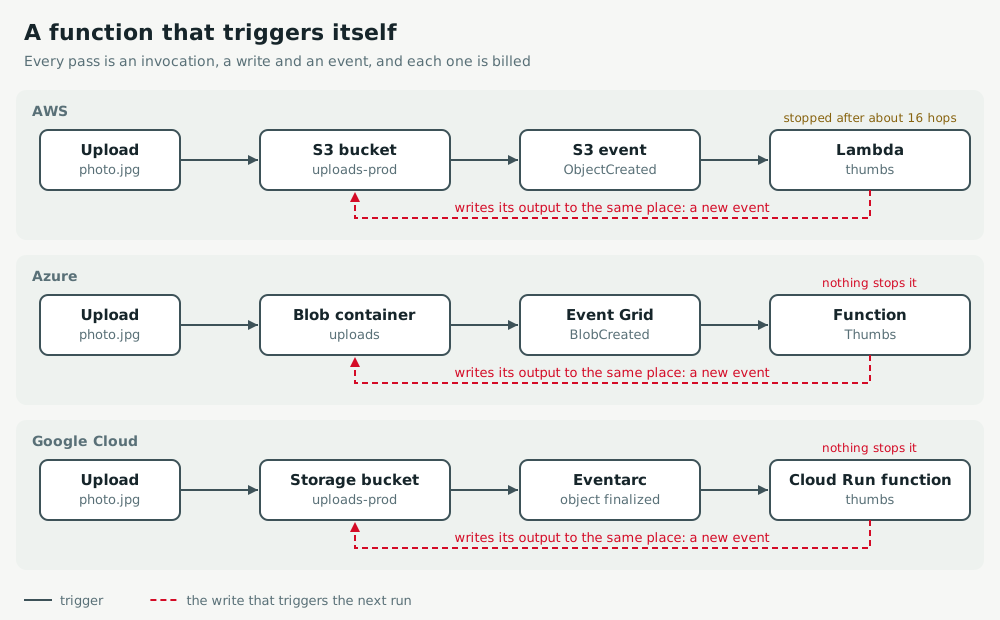
- The trigger fires on every new object in the bucket or container. The function writes its result (a thumbnail, a converted file, a metadata copy) back to the same place, and that write fires the trigger again.
- An HTTP or edge function that calls its own public hostname loops the same way.
- Each pass is an invocation, a storage write and an event, all billed. Only AWS stops some of these loops by itself.
Act
AWS
Stop a running loop first: reserved concurrency of 0 throttles every invocation. Then scope the S3 notification to an input prefix and write output elsewhere. Keep recursive loop detection on Terminate; it covers S3, SQS and SNS, not DynamoDB or HTTP calls. A Lambda@Edge function must fetch the origin directly, never its own distribution.
aws lambda put-function-concurrency --function-name thumbs --reserved-concurrent-executions 0
aws lambda put-function-recursion-config --function-name thumbs --recursive-loop Terminate
aws s3api put-bucket-notification-configuration --bucket uploads-prod --notification-configuration \
  '{"LambdaFunctionConfigurations":[{"LambdaFunctionArn":"arn:aws:lambda:eu-west-1:111122223333:function:thumbs",
  "Events":["s3:ObjectCreated:*"],"Filter":{"Key":{"FilterRules":[{"Name":"prefix","Value":"incoming/"}]}}}]}'
Azure
Nothing on Azure detects the loop. Stop it by disabling the function, then subscribe to an input container only and write output to another one. A blob trigger takes the same scope from its path, incoming/{name}.
az functionapp config appsettings set -g rg-media -n func-thumbs --settings AzureWebJobs.Thumbs.Disabled=true
az eventgrid event-subscription create -n thumbs --source-resource-id "$STORAGE_ID" \
  --endpoint-type azurefunction --endpoint "$FUNCTION_ID" \
  --included-event-types Microsoft.Storage.BlobCreated \
  --subject-begins-with /blobServices/default/containers/incoming/
Google Cloud
A Cloud Storage trigger filters on the bucket only, with no prefix, so output must go to another bucket. Stop a running loop by deleting the Eventarc trigger; the function stays. Cap instances so the next mistake runs slower.
gcloud eventarc triggers list --location=europe-west1
gcloud eventarc triggers delete thumbs-123456 --location=europe-west1
gcloud functions deploy thumbs --gen2 --region=europe-west1 --runtime=python312 --source=. \
  --entry-point=handler --trigger-bucket=uploads-incoming \
  --set-env-vars=OUTPUT_BUCKET=uploads-processed --max-instances=10
Keep watch
AWS
Alarm on RecursiveInvocationsDropped above zero: Lambda stopped a loop. Alarm on Invocations far above the uploads you expect, since loops through DynamoDB or HTTP are not detected.
Azure
Alert on the function app's Function Execution Count and on the storage account's Transactions split by API name, filtered on PutBlob. Executions should follow uploads, never exceed them.
Google Cloud
Alert on the function's run.googleapis.com/request_count and on the bucket's storage.googleapis.com/api/request_count for method="WriteObject". Both rising with no new uploads is a loop.
Exercise
Find the misrouted location yourself: The nightly job reprocesses everything.