 AWS
 Azure
 Google Cloud
In one sentence: a teardown deletes only what its tool tracks, so give every environment one container that deletes as a unit and a query that must come back empty afterwards.
Symptom
The test environment was destroyed last week, yet daily cost never returned to its baseline. Cost by service still shows disk, snapshot, storage and IP address lines, and the cost carries no environment tag, or a tag nobody can map to anything still running.
How it happens
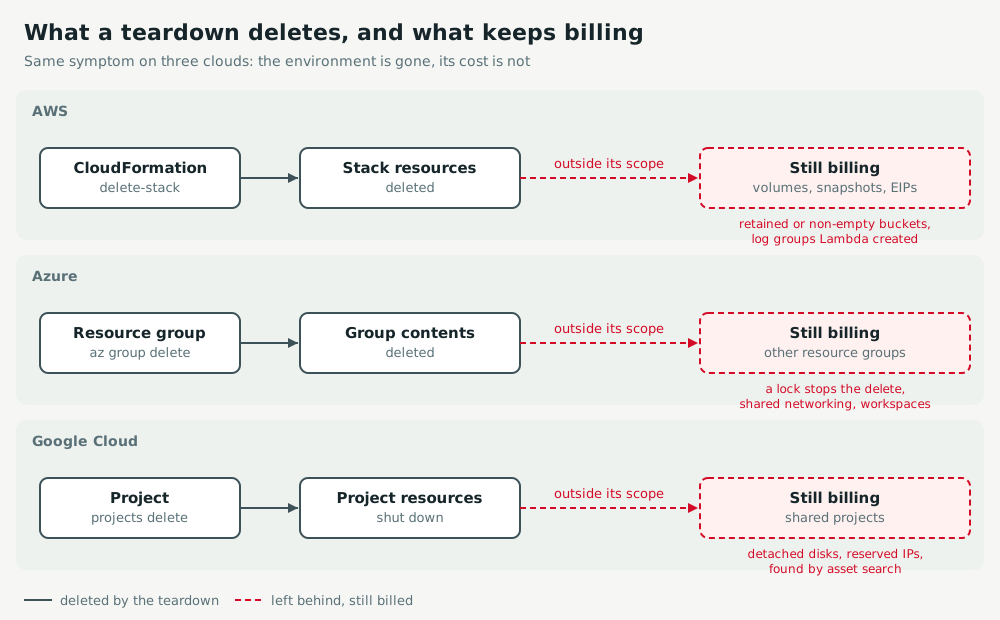
- Implicit children: a function creates its log group, an instance leaves a detached disk or snapshot, a gateway keeps a reserved IP. The template never declared them, so the teardown never deletes them.
- Protected or retained: a retain policy, a non-empty bucket, a lock or deletion protection makes the delete skip or fail, often in a status nobody reads.
- Out of scope: a resource created by hand, or in a shared group or project, is invisible to the tool that tore the rest down.
Act
AWS
Tag every resource with project at creation (stack tags propagate) and activate it as a cost allocation tag. After delete-stack, look for stacks in DELETE_FAILED, then search with Resource Explorer (an aggregator index covers every region) for the tag and for untagged resources.
aws cloudformation list-stacks --stack-status-filter DELETE_FAILED
aws resource-explorer-2 search --query-string "tag:project=demo-env"
aws ec2 describe-volumes --filters Name=status,Values=available
Azure
Put each environment in its own resource group and delete the group, not its resources one by one. A lock stops the delete with ScopeLocked: remove it deliberately. Then find what was created elsewhere with the environment's tag.
az lock list -g rg-demo-env -o table
az group delete -n rg-demo-env --yes
az resource list --tag project=demo-env -o table
Google Cloud
Give each environment its own project and delete the project: billing for its resources stops at shutdown, whatever the template forgot. In a shared project, search Cloud Asset Inventory by label, and list detached disks and reserved addresses.
gcloud projects delete demo-env-123
gcloud asset search-all-resources --scope=organizations/ORG_ID --query="labels.project:demo-env"
gcloud compute disks list --filter="-users:*"
Keep watch
AWS
In Cost Explorer, group by the project tag and by "No tag": the torn down value must fall to zero within a day or two. The Resource Explorer search above must return nothing; run it from the teardown pipeline.
Azure
In Cost analysis, group by resource group and by the project tag: the deleted group must disappear. az group exists -n rg-demo-env must print false and the tag search must be empty.
Google Cloud
In the billing report, group by project and by the project label: the deleted project must stop accruing. The asset search must return nothing, and gcloud compute addresses list --filter="status=RESERVED" must not list the environment's addresses.
Exercise
Find what an earlier iteration left behind in Checkout workflows stall before they finish, then stop storage that never ages out in Log storage costs keep climbing.
Related: budget alerts that arrive too late.