 AWS
 Azure
 Google Cloud
In one sentence: a CDN cuts bucket egress only when requests hit its cache and nobody can reach the bucket without going through it; break either condition and the bucket keeps serving the internet.
Symptom
The CDN went live, yet storage egress keeps climbing. The cache hit ratio sits on a low plateau, origin requests track client requests almost one for one, and the bucket hostname shows up in access logs or in an app build.
How it happens
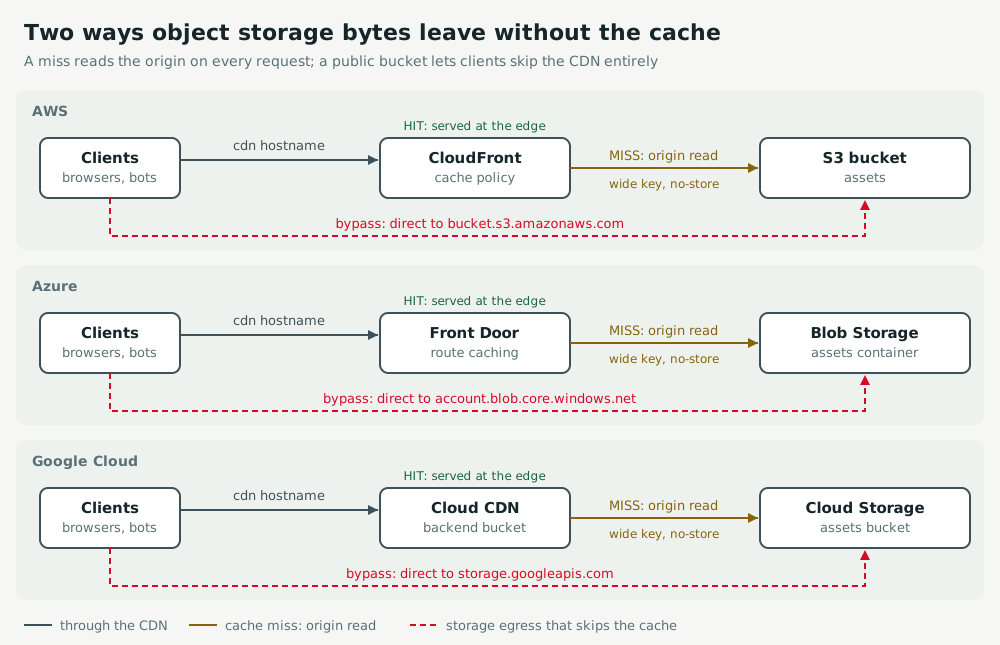
- Cache misses: a cache key that includes every query string or cookie, a
no-storeorprivateheader, or a TTL too short to survive until the next request. Every miss is a bucket read. - Cache bypass: the bucket is publicly readable and some clients use its own hostname. No CDN setting helps them.
- Close the bypass first: it is a security hole as well as a cost one. Then narrow the cache key, then the TTLs.
Act
AWS
Lock the bucket behind Origin Access Control: the bucket policy grants s3:GetObject only to cloudfront.amazonaws.com for your distribution ARN, and Block Public Access stays on. On each behaviour, replace CachingDisabled or a policy that keys on all query strings with CachingOptimized, and forward what the origin needs through an origin request policy.
aws s3api put-public-access-block --bucket assets-prod --public-access-block-configuration \
  BlockPublicAcls=true,IgnorePublicAcls=true,BlockPublicPolicy=true,RestrictPublicBuckets=true
Azure
Turn off anonymous access on the storage account, and with Front Door Premium use a Private Link origin so only Front Door reaches it. On each route that serves blobs, enable caching and set the query string behaviour to "Ignore query string", unless the content really varies by query.
az storage account update -g rg-web -n stassetsprod --allow-blob-public-access false
Google Cloud
Remove the allUsers binding from the bucket, grant read access to the Cloud CDN fill service account, serve through signed URLs, and enforce public access prevention. On the backend bucket, check that enableCdn is true and restrict the cache key to the query parameters that change the content.
gcloud storage buckets remove-iam-policy-binding gs://assets-prod --member=allUsers --role=roles/storage.objectViewer
gcloud storage buckets update gs://assets-prod --public-access-prevention
gcloud compute backend-buckets update assets-backend --cache-key-query-string-whitelist=v
Before you lock the origin, replace the bucket hostname with the CDN hostname in code, templates and app builds, or those clients break.
Keep watch
AWS
Alarm on the distribution's CacheHitRate (additional metrics enabled) and on S3 request metrics BytesDownloaded for the assets prefix. Prove the fix: a second curl -sI through CloudFront returns x-cache: Hit from cloudfront, and the bucket URL returns AccessDenied.
Azure
Alert on the profile's Byte Hit Ratio and on the storage account's Egress split by Authentication: anonymous GetBlob calls should fall to zero. Prove the fix: a second request through Front Door returns x-cache: TCP_HIT.
Google Cloud
Alert on the load balancer request_count split by cache_result, and on the bucket's network/sent_bytes_count. Prove the fix: a second request through Cloud CDN carries an Age header above zero, and storage.googleapis.com answers AccessDenied.
Exercise
Fix it for real, with the clock running: Open to the whole internet, then Storefront slows under a traffic surge.
Go deeper: every measurement, setting and trap.