 AWS
 Azure
 Google Cloud
The two-minute version is Object storage egress and CDN caching limits. This page keeps every detail.
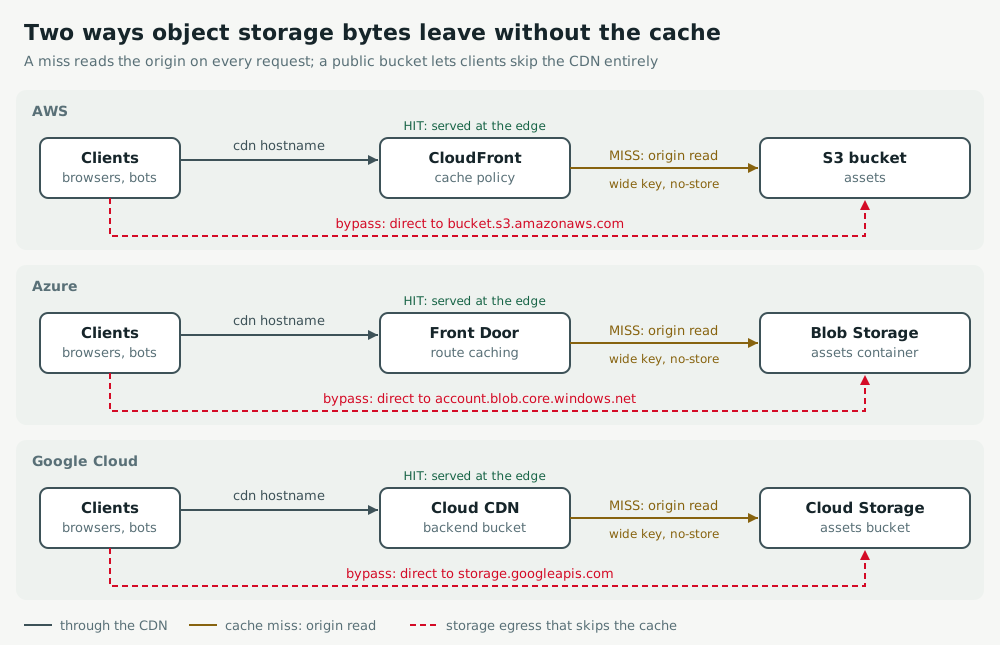
Putting a CDN in front of a bucket is the standard answer to a growing data transfer line on the bill, and it is often the right one. It only works under two conditions that nobody checks after the first deployment: requests must hit the cache, and clients must not be able to reach the bucket without going through the CDN. When either condition fails, the bucket keeps serving bytes to the internet, the CDN adds its own requests on top, and the dashboards show a CDN that is in place and doing very little.
This guide covers Amazon S3 with CloudFront, Azure Blob Storage with Azure Front Door, and Google Cloud Storage with Cloud CDN. The mechanics are the same on all three; the setting names, the metrics and the default behaviour differ.
Recognise the pattern
Storage egress that keeps climbing after a CDN went live is the main symptom. Others are a cache hit ratio that never rises above a low plateau, origin request counts that track client request counts almost one for one, a bucket hostname that appears in access logs, page source or a mobile app build, and a sudden rise after a deployment that changed headers or query strings rather than content.
Two separate paths produce it, and they need different fixes:
- Cache misses. The CDN forwards most requests to the origin because the cache key is too wide, the response is marked uncacheable, or the TTL is so short that objects expire before the next request. Every miss is an origin read, so the bucket still serves the bytes.
- Cache bypass. The bucket is publicly readable and some clients use its own hostname. Those requests never touch the CDN, so no CDN setting can help. Crawlers and hotlinkers find bucket URLs quickly once one is published anywhere.
Measure before changing anything
Get three numbers for the same time window before touching configuration: requests served by the CDN, requests and bytes served by the bucket, and the split of CDN responses between hits and misses. If bucket bytes are close to CDN bytes, the cache is not absorbing anything. If bucket requests exceed CDN misses, something reaches the bucket without the CDN.
Measure over at least a full day so batch jobs and traffic peaks are included, and compare with a period before the last deployment. Billing data lags by hours, so use service metrics for diagnosis and billing data to confirm the result afterwards.
Amazon S3 with CloudFront
Data transfer from S3 to CloudFront is not charged as internet egress, but every CloudFront miss is still an S3 GET request, and every direct request to the bucket is internet egress from S3. In Cost Explorer, group S3 usage by usage type and look at the DataTransfer-Out-Bytes line for the Region; it should fall once the distribution takes the traffic.
On the distribution, enable the additional metrics and read CacheHitRate. Then check which cache policy each behaviour uses. CachingOptimized keeps query strings, cookies and most headers out of the cache key and honours origin Cache-Control; CachingDisabled sends every request to the origin and is often left on a static path after it was copied from an API behaviour. A custom policy that includes all query strings or all cookies creates one cache entry per unique value, so a tracking parameter alone can drop the hit rate close to zero. Forward what the origin needs with an origin request policy instead, which does not widen the key.
aws cloudfront get-distribution-config --id E1A2B3C4D5E6F7 \
  --query 'DistributionConfig.{default:DefaultCacheBehavior.CachePolicyId, paths:CacheBehaviors.Items[].{path:PathPattern, policy:CachePolicyId}}'

aws cloudfront get-cache-policy --id 658327ea-f89d-4fab-a63d-7e88639e58f6 \
  --query 'CachePolicy.CachePolicyConfig.{name:Name, minTtl:MinTTL, defaultTtl:DefaultTTL, key:ParametersInCacheKeyAndForwardedToOrigin}'
Inspect responses as well: x-cache and the x-edge-result-type field in standard logs report Hit, RefreshHit, Miss or Error. Objects uploaded with Cache-Control: no-store or private are never cached, whatever the policy says, unless the policy's minimum TTL overrides the header. For a global audience, Origin Shield adds one regional cache layer and collapses misses from many edge locations into one origin request.
For the bypass path, check the bucket. With Origin Access Control on the distribution, the bucket policy grants s3:GetObject to the cloudfront.amazonaws.com service principal conditioned on the distribution ARN, and Block Public Access stays on at both the account and the bucket level. A bucket policy with "Principal": "*", or a static website endpoint used as the origin, means the bucket answers anyone.
aws s3api get-public-access-block --bucket assets-prod
aws s3api get-bucket-policy-status --bucket assets-prod
aws s3api get-bucket-policy --bucket assets-prod --query Policy --output text
To measure what still reaches the bucket, enable S3 request metrics on a filter for the assets prefix and read GetRequests and BytesDownloaded. Server access logs or CloudTrail data events then show the user agents and referrers of requests that did not come from CloudFront.
Azure Blob Storage with Azure Front Door
Front Door caches only on routes where caching is enabled; a route created without it proxies every request to the origin. On each route that serves blobs, check that caching is on, then check the query string caching behaviour. "Use query string" caches one entry per unique query string, which is correct for content that varies by query and wrong for assets whose URLs carry tracking or cache-busting parameters. "Ignore query string" or "Ignore specified query strings" restores the hit ratio. Rule sets can override cache expiration per path; a rule set that bypasses cache for a whole route is a common leftover from debugging.
az afd route show --resource-group rg-web --profile-name fd-web \
  --endpoint-name assets --route-name blobs \
  --query "{caching:cacheConfiguration, ruleSets:ruleSets[].id, patterns:patternsToMatch}"
Front Door reports Byte Hit Ratio and Origin Request Count as metrics on the profile. For a per-request view, send FrontDoorAccessLog to a Log Analytics workspace and group by cacheStatus_s. HIT and REMOTE_HIT are served from cache; MISS, PARTIAL_HIT, CONFIG_NOCACHE and UNCACHEABLE reach the origin, and the last two say the configuration or the response headers forbid caching. Large blobs are fetched from the origin in 8 MB chunks, so partial hits are expected on large downloads.
AzureDiagnostics
| where Category == "FrontDoorAccessLog"
| summarize requests = count(), bytes = sum(toreal(responseBytes_s)) by cacheStatus_s
| order by bytes desc
For the bypass path, read the storage account. allowBlobPublicAccess set to true together with a container whose public access level is blob or container lets anyone read the blobs at the account hostname. With Front Door Premium, a Private Link origin lets you set the storage account's public network access to disabled, so only Front Door reaches it. On Standard, at least turn off anonymous access and authorise Front Door with a SAS on the origin path, rotated like any secret.
az storage account show --resource-group rg-web --name stassetsprod \
  --query "{anonymous:allowBlobPublicAccess, network:publicNetworkAccess}"
az storage container list --account-name stassetsprod --auth-mode login \
  --query "[].{name:name, access:properties.publicAccess}"
Then measure the account directly. The storage Egress and Transactions metrics split by the ApiName and Authentication dimensions; Anonymous transactions on GetBlob that are not explained by Front Door misses are clients using the account hostname.
Google Cloud Storage with Cloud CDN
Cloud CDN serves a bucket through a backend bucket on an external Application Load Balancer, and caching applies only when enableCdn is true on that backend bucket. Check the cache mode next. CACHE_ALL_STATIC, the default, caches static content types and honours origin headers; USE_ORIGIN_HEADERS caches only what the object metadata allows, so objects without Cache-Control are never cached; FORCE_CACHE_ALL caches everything, including objects that should stay private. The default TTL is 3600 seconds and the maximum TTL 86400 seconds unless you change them.
gcloud compute backend-buckets describe assets-backend \
  --format="yaml(bucketName,enableCdn,cdnPolicy.cacheMode,cdnPolicy.defaultTtl,cdnPolicy.maxTtl,cdnPolicy.cacheKeyPolicy)"
The cache key includes the full query string by default. If asset URLs carry parameters that do not change the content, set a cache key policy with an allowlist of the query parameters that matter, or none. Check object metadata too: Cloud Storage serves publicly readable objects with Cache-Control: public, max-age=3600 by default, but an object uploaded with no-store or private is never cached in the default mode.
gcloud compute backend-buckets update assets-backend \
  --cache-key-query-string-whitelist=v

gcloud storage objects describe gs://assets-prod/app/main.js \
  --format="value(cache_control,content_type)"
Load balancer request logs carry httpRequest.cacheLookup, httpRequest.cacheHit and httpRequest.cacheFillBytes. In Cloud Monitoring, the load balancer request_count metric has a cache_result label (HIT, MISS, DISABLED), which gives the hit ratio without parsing logs.
For the bypass path, look at the bucket IAM policy. A binding of allUsers to roles/storage.objectViewer makes every object readable at storage.googleapis.com, whatever the CDN does. To keep the bucket private behind Cloud CDN, grant read access to the Cloud CDN fill service account, service-PROJECT_NUMBER@cloud-cdn-fill.iam.gserviceaccount.com, and serve content through signed URLs or signed cookies. Enforce public access prevention on the bucket once the binding is gone.
gcloud storage buckets get-iam-policy gs://assets-prod --format=json
gcloud storage buckets update gs://assets-prod --public-access-prevention
The bucket's storage.googleapis.com/network/sent_bytes_count metric, split by method, shows what the bucket still serves; compare it with the CDN's cache fill bytes over the same window.
Apply the smallest fix
Close the bypass first, because it is a security issue as well as a cost one and no cache tuning helps it. Then fix the cache key, then the TTLs, and change one at a time so the effect of each is visible in the hit ratio.
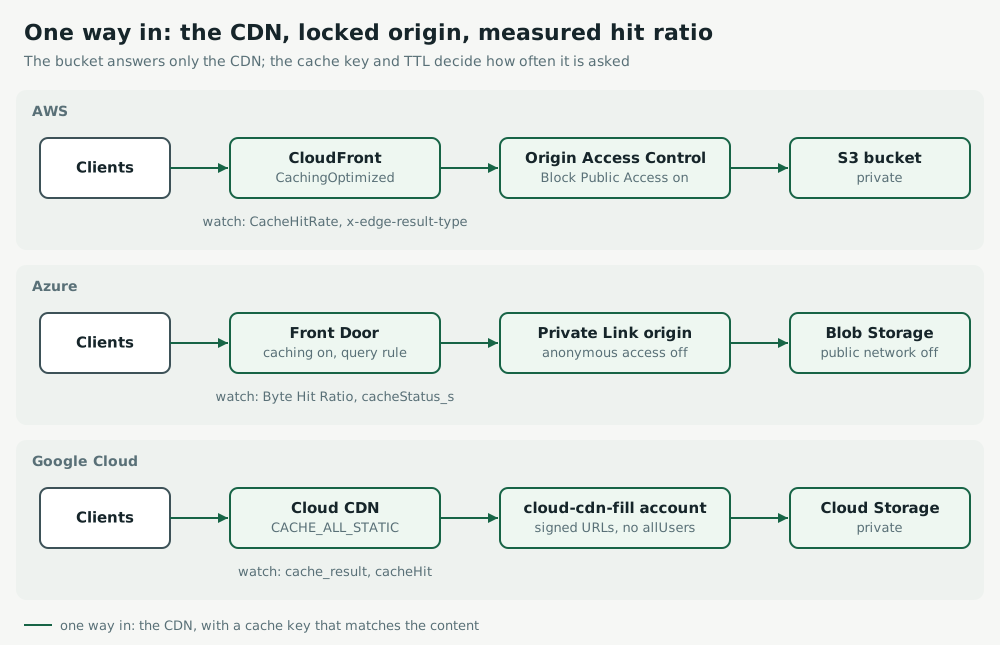
- Lock the origin so it answers only the CDN: Origin Access Control and Block Public Access on S3, a Private Link origin or SAS-authorised origin with anonymous access off on Blob Storage, the fill service account and public access prevention on Cloud Storage.
- Search code, templates and app builds for the bucket hostname and replace it with the CDN hostname before locking the origin, or those clients break.
- Narrow the cache key to what changes the content: drop tracking parameters and cookies from it.
- Set
Cache-Controlon uploads in the deployment pipeline, with long lifetimes for fingerprinted assets and short ones for HTML, rather than relying on CDN defaults. - Add an alert on the hit ratio and on bucket egress, so a deployment that widens the key again is visible within hours.
Verify the result
Request an asset twice through the CDN and read the response headers: x-cache: Hit from cloudfront on CloudFront, x-cache: TCP_HIT on Front Door, and an Age header greater than zero on Cloud CDN. Request the same object at the bucket hostname and expect a refusal: AccessDenied from S3, PublicAccessNotPermitted or an authorisation error from Blob Storage, AccessDenied from Cloud Storage.
curl -sI https://cdn.example.com/app/main.js | grep -iE '^(x-cache|age|cache-control):'
curl -sI https://cdn.example.com/app/main.js | grep -iE '^(x-cache|age|cache-control):'
curl -sI https://storage.googleapis.com/assets-prod/app/main.js | head -n 1
Then compare the three measurements from the start over the same length of window. The hit ratio should rise, bucket requests should fall towards the CDN miss count, and bucket egress to the internet should approach zero. Confirm on the bill a few days later, since billing data trails usage.
Avoid the traps
- Do not invalidate or purge the whole cache to fix a stale object; it turns the next minutes into a full origin read. Purge the path, or version the file name.
- Do not raise TTLs on HTML or API responses to lift the hit ratio; cache what is static and version it.
- Do not use
FORCE_CACHE_ALLor a minimum TTL override on a bucket that also holds private objects. - Do not treat a high request hit ratio as success; large objects dominate egress, so watch the byte hit ratio.
- Do not forget log and backup buckets: they are rarely behind a CDN and their egress comes from tools that download them.
Practise on a live incident
These Shakeride challenges reproduce the failures above in a sandbox account:
- Open to the whole internet: a bucket readable by anyone, on S3, Blob Storage and Cloud Storage.
- Storefront slows under a traffic surge: an edge layer that passes the load straight to the origin, on Front Door and Cloud Load Balancing.
- Log storage costs keep climbing: storage that grows without anyone reading it.