 Google Cloud
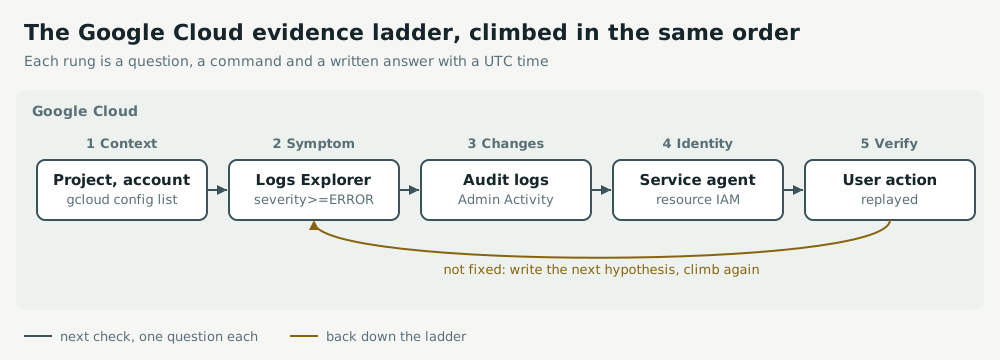
In one sentence: on Google Cloud, rehearse the first ten minutes until they are automatic: confirm the project, read bounded logs, ask Admin Activity audit logs what changed, then name the identity that performs the failing step and read the IAM policy on that one resource.
Symptom
A Pub/Sub subscription never dead-letters, or a Cloud Run service cannot read a secret it read yesterday, and nothing in the application says why. Or every list command comes back empty, because the active project is not the one in the brief.
How it happens
- Resources, IAM, logs and quotas are scoped to a project: the wrong project returns empty results that look like evidence.
- Managed features act as Google-managed service agents, such as
service-PROJECT_NUMBER@gcp-sa-pubsub.iam.gserviceaccount.com. A cleanup that removes unfamiliar accounts removes their grants, and nothing errors. - Admin Activity audit logs are always on; Data Access logs mostly are not, so an empty result there proves nothing about reads.
Act
Thirty minutes in a sandbox project, on a failure you did not build. Say what each command should return before you run it, and write the answer with its UTC time.
gcloud config list --format="value(core.account,core.project)"
gcloud logging read 'resource.type="cloud_run_revision" AND severity>=ERROR' --freshness=30m --limit=20
gcloud logging read 'logName:"cloudaudit.googleapis.com%2Factivity"' --freshness=1h --limit=20 \
  --format="table(timestamp,protoPayload.methodName,protoPayload.authenticationInfo.principalEmail)"
gcloud pubsub topics get-iam-policy orders-dead-letter
Grant the narrowest role on the resource the feature touches, never a project-wide role that hides the symptom. Verify by replaying the user's action.
Keep watch
Log each drill: did the project check come first, minutes to name the failing identity, and how many grants you made at project level rather than on a resource. Both of the last two should fall over the weeks.
Exercise
Follow the service agent in Bad messages with nowhere to go, then restore one narrow grant in A service can no longer read its secret.
Related: AWS troubleshooting practice, Azure troubleshooting practice.