 Azure
In one sentence: Azure incidents reward a short opening you have rehearsed: confirm the subscription, ask the activity log what changed, then read the configuration and role assignments of the one resource closest to the symptom.
Symptom
You list resources and get an empty table, then spend ten minutes before noticing you are in another subscription. Or you grant a broad role at the resource group because it makes the error stop, and nobody can say what was actually missing.
How it happens
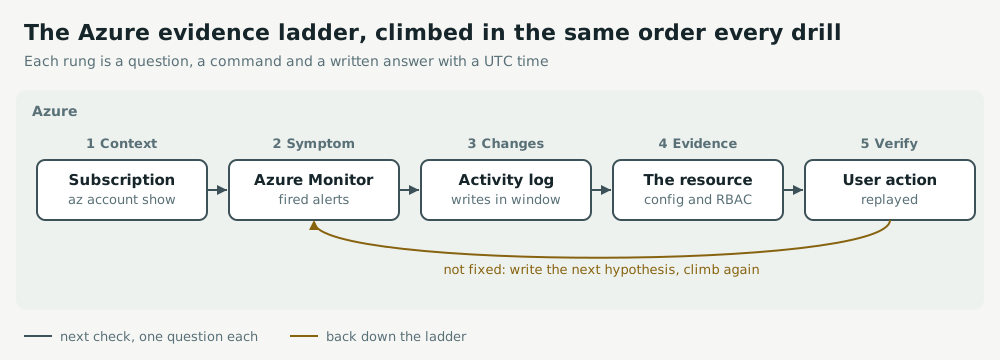
- One account often sees several subscriptions; a command against the wrong one returns nothing, which reads like a finding.
- The activity log records control-plane writes only: an empty result says nothing about the data plane.
- Two settings explain many messaging incidents: a lock shorter than processing time means a second worker gets the same message, and a low max delivery count dead-letters too early.
Act
Thirty minutes in a sandbox subscription, on a failure you did not build. Run the opening in order, writing each answer with its UTC time, then make one predicted change.
az account show --query "{sub:name,tenant:tenantId}" -o table
az monitor activity-log list --start-time 2026-10-20T08:00:00Z --end-time 2026-10-20T08:30:00Z \
  --query "[].{t:eventTimestamp,op:operationName.localizedValue,who:caller}" -o table
az servicebus queue show -g drill-rg --namespace-name drill-bus -n orders \
  --query "{lock:lockDuration,maxDelivery:maxDeliveryCount,dlq:countDetails.deadLetterMessageCount}"
az role assignment list --scope "$(az keyvault show -n drill-vault --query id -o tsv)" -o table
Fix at the narrowest scope: Key Vault Secrets User on the vault, not a broad role on the resource group. For a fired alert, open its action group and confirm a receiver exists. Verify by replaying the user's action.
Keep watch
After each drill, record minutes to the right subscription and the right resource, changes made without a prediction, and the scope of every role you granted. The scope column should shrink toward single resources over the weeks.
Exercise
Drill the lock duration with The same order is processed twice, then a narrow RBAC fix with A service can no longer read its secret.
Related: AWS troubleshooting practice, Google Cloud troubleshooting practice.