 AWS
 Azure
 Google Cloud
In one sentence: a data access audit log writes one event per object read or write, so "all buckets, all operations" bills you for every request your own pipelines make; scope it to the data that needs a trail.
Symptom
The audit logging line of the bill grows with storage request counts, not with admin activity. It started the day someone enabled data access logging account-wide for a compliance review, and it doubles when a batch job or an analytics scan runs.
How it happens
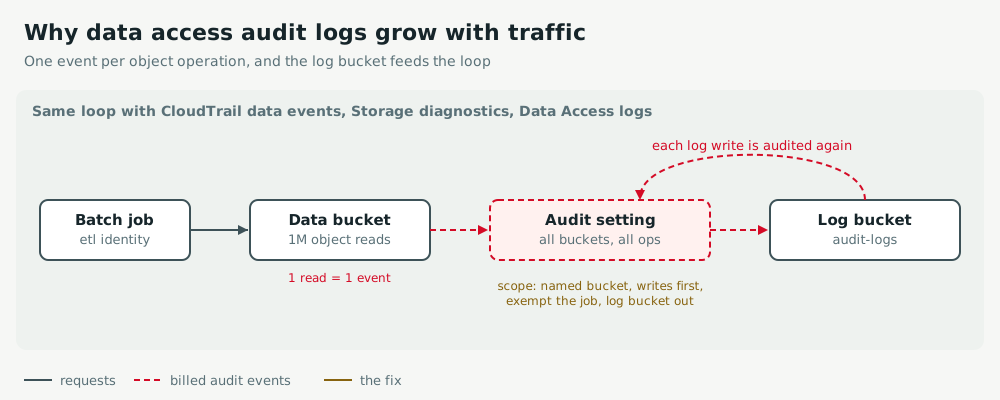
- Volume follows traffic: a management event is one per API change; a data event is one per object
GETorPUT. A job reading a million objects writes a million events. - The loop: if the bucket that receives the logs is itself in scope, every log delivery is a write that is logged again.
- Scope by resource, record writes before reads, exempt the high-volume service identity, and keep the log destination out of scope.
Act
AWS
Replace "all S3 buckets" with advanced event selectors naming the regulated bucket, and log reads only where an audit requires them. Never select the trail's own log bucket. Check that a second trail does not record the same data events: each copy is billed.
aws cloudtrail put-event-selectors --trail-name org-trail --advanced-event-selectors '[{"Name":"regulated writes",
  "FieldSelectors":[{"Field":"eventCategory","Equals":["Data"]},{"Field":"resources.type","Equals":["AWS::S3::Object"]},
  {"Field":"readOnly","Equals":["false"]},{"Field":"resources.ARN","StartsWith":["arn:aws:s3:::regulated-data/"]}]}]'
Azure
On the blob service of the account that needs a trail, keep StorageWrite and StorageDelete and drop StorageRead unless an audit asks for reads. Do not enable diagnostic settings on the account that receives the logs, and prefer an archive storage account over Log Analytics for long retention.
az monitor diagnostic-settings create --name blob-audit --workspace "$LAW_ID" \
  --resource "$(az storage account show -n stregulated --query id -o tsv)/blobServices/default" \
  --logs '[{"category":"StorageWrite","enabled":true},{"category":"StorageDelete","enabled":true}]'
Google Cloud
Data Access audit logs are billed on ingestion, unlike Admin Activity. In the project IAM policy, replace an allServices audit config with one for storage.googleapis.com, and exempt the pipeline's service account from DATA_READ. Apply with gcloud projects set-iam-policy.
auditConfigs:
- service: storage.googleapis.com
  auditLogConfigs:
  - logType: DATA_WRITE
  - logType: DATA_READ
    exemptedMembers: [serviceAccount:etl@prod-data.iam.gserviceaccount.com]
Keep watch
AWS
In Cost Explorer, filter on CloudTrail and group by usage type: DataEventsRecorded should drop, and PaidEventsRecorded reveals duplicate trails. aws cloudtrail get-event-selectors --trail-name org-trail proves the scope.
Azure
Alert on the Usage table where DataType == "StorageBlobLogs". Prove the fix: StorageBlobLogs | where OperationName == "GetBlob" returns no new rows.
Google Cloud
Create a log-based metric on logName:"cloudaudit.googleapis.com%2Fdata_access" and alert on its rate. Prove the fix: no new entries name the exempted service account.
Exercise
Restore an audit trail without over-recording: The activity record went quiet, then A regulated data set fails its audit.
Related: Log ingestion spikes.